 CosNFX
Make your move
Assign a cue to a wrist or arm gesture. Use the seven built-in gestures, calibrate them to your movement, or record a custom gesture for Pro performance.
Choose a button on your profile image, then set its sounds, visuals and device actions. Add a combo or timed sequence when one gesture needs to do more.
A sword sound on the watch, a rumble from the phone and a lighting cue across the room. Build the response around your performance.
New performance controls are prepared for the next CosNFX update. The current app is on Google Play.
Make an entrance. Start the atmosphere with your first move.
Reveal on cue. Give your prop its own moment.
Finish strong. Call the sequence that closes the scene.
Set up the sounds and commands before the performance. When the moment comes, a movement, your chosen phrase or a location event can call the cue.
Choose the soundtrack and the first lighting command. Assign them to a gesture or the start of a saved timeline.
Add the commands your receiver needs. A cue can combine a short sound, an independent soundtrack action and up to eight prop outputs.
Arrange later actions at offsets from Start, then choose Ignore or Restart for another trigger. Stop cancels the remaining steps and the retired run’s soundtrack.
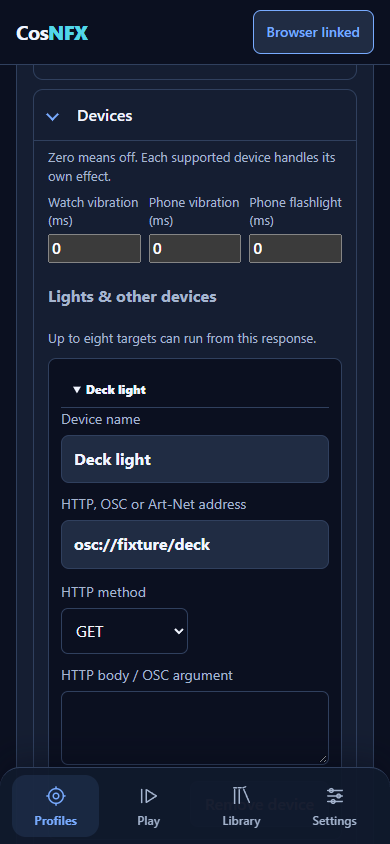
The image shows Choreographer with an example setup. Prepare and test a custom setup for free while disarmed; Pro enables it during live use.
Keep the action in your performance. Configure what each event means before you go live.
Assign a cue to a wrist or arm gesture. Use the seven built-in gestures, calibrate them to your movement, or record a custom gesture for Pro performance.
Save complete phrases, with alternate phrases for the same cue. Start listening explicitly on the visible watch screen, either once or while the app stays open.
Trigger on entering a zone, leaving it, or staying there for a set time. Use outdoor watch GPS or a configured external tracker. Precise indoor positioning needs a suitable tracker.
CosNFX pairs its character sounds with animated visuals. Make the watch part of the costume, then build your own performance around it.
The original characters get their own optional three-move combos in this update. Keep each gesture's normal effect, then add actions during the combo and a final response when you complete it.
CosNFX animation previews, shown muted. These show screen effects, not connected stage equipment.
Raise your arm at the entrance to begin a track. Make the same gesture at the prop station to send a lighting cue.
Zone rules can replace or suppress the base gesture action. Spoken phrases can also be scoped to a zone. When a relevant location is unknown, the app holds the affected rule rather than guessing where you are.
You supply the zones, tracking source and actions. This is an example, not an included profile or an indoor tracking system.
Tap a button on your profile image to open Choreographer. Set its gesture, sounds, screen effects and device actions in one place.
Place Main, Support and Environmental sounds on the watch, phone or Mission Control. Choose a different visual for each screen, add phone light and vibration, or send several HTTP, OSC or Art-Net commands to lights, DIY props and show software.
A combo keeps the normal effects from its gestures. Add actions along the way and give the finale its own response. Voice cues, location events and timeline steps use the same controls.
Link two CosNFX users on the same local network. The leader's accepted buttons trigger the matching buttons in the follower's own profile. Each person needs Pro, arms their own watch and chooses Ready. Each device plays through its own selected speakers, so timing can vary.
Main CosNFX app development preview, with matching watch and phone updates required. Setup and testing are free; custom live performance uses Pro.
Add steps at offsets from Start. Each can combine a sound, a soundtrack action and several prop commands. Trigger the sequence with a gesture, location, voice cue or manual Start.
Put actions at the same offset to cue several things together, or spread them across the scene. One cue supports up to eight prop actions alongside its audio.
Ignore another Start while the timeline is running, or restart the sequence from zero. Stop cancels remaining steps and the retired run's owned soundtrack.
Saving and previewing do not start a timeline. Reconnecting does not restart a show. Already transmitted commands and emitted short effects cannot be undone.
Timelines use relative time, with offsets up to 30 minutes, 16 timelines and 128 total steps. They coordinate cues; wireless delivery and physical reactions are not guaranteed to happen at exactly the same instant.
Start a background track, loop it through a scene, and still trigger short effects over it.
Choose Start / keep playing, Restart or Stop soundtrack. Set the volume and loop behavior per action. A completed timeline can leave its loop playing until another action or Disarm stops it.
Main: the action you want people to recognize.
Support: a second detail, such as a mechanical follow-through.
Environmental: the scene around it, such as wind or a distant rumble.
Choose the destination, volume and delay for each layer. Use the watch, paired phone or a linked Mission Control browser.
Keep Mission Control visible for reliable browser sound. Wireless delivery can vary; rehearse the full setup before using it in a performance.
Configure a local-network receiver or compatible controller. The shared output engine supports three command paths.
Send configured web requests and command bodies to controllers or services with a compatible API. Local HTTP and user-configured public HTTPS endpoints are supported.
Send a configured OSC address with a bang, numeric value or text argument to a compatible show-software or prop receiver on the local network.
Send a manual unicast ArtDMX channel update to a configured lighting node. Continuous refresh, discovery and receiver acknowledgement are outside this first implementation.
Device-specific compatibility depends on the receiver's interface and setup. A UDP send is reported as sent, unconfirmed. MIDI, direct Bluetooth prop adapters, MQTT, sACN and other output families remain future work.
The original 30 character profiles, their built-in sounds and visuals, seven gestures and basic combos stay free. You can prepare and test your own setup while disarmed. Pro is a one-time upgrade for using custom content and advanced cues during live performance. New profile packs are planned separately and are not on sale yet.
Yes. Disarmed phrase, location-rule and timeline previews inspect configuration without opening a microphone or firing outputs. Explicit sound and prop Test buttons do perform their named effects. Saving, restoring or reconnecting never automatically arms a show or starts a timeline.
Voice begins with an explicit action on the visible watch screen and stops when that screen pauses or closes. On-device recognition is preferred; a separately confirmed system recognizer may use the network. Gesture sessions and running timelines can continue with the screen closed. A screen-off session is not a watchface or complication.
Watch GPS is for outdoor zones and needs precise permission and a deliberate start on the watch. Indoor stage zones need a suitable external tracker you configure. Props need a receiver compatible with your HTTP/HTTPS, OSC or Art-Net commands. OSC and Art-Net use local-network UDP; a successful send is unconfirmed. Art-Net here is manual unicast ArtDMX, without discovery or continuous refresh. MIDI, direct Bluetooth prop control, MQTT and sACN remain future work.
Offsets are relative to Start, not calendar time or external timecode. The watch checks active timelines every 20 ms; steps more than 500 ms late are skipped. Network delivery and physical reactions are not sample-synchronized. Stop cancels pending steps and music still owned by that run. Disarm retires the performance. Already emitted sounds and transmitted commands cannot be withdrawn.
This page previews the next CosNFX update. The current Google Play version may differ; update the watch and phone together when it becomes available. New profile packs are planned for a following release. Recognition, GPS, speakers, receivers and battery behavior still need checking with your own equipment.
Start with an included character, keep the effects you like and change the rest. Your own sounds and artwork belong in the same workflow.